RiskOS — The risk register for Mac
Score risks on a living matrix, link the controls that actually reduce them, watch the residual fall, and export a report your board will read. Everything stays on your Mac.
Walk me through RiskOS.
Six steps through the app, from the dashboard you open on to the report you send out.
One window, fourteen sections
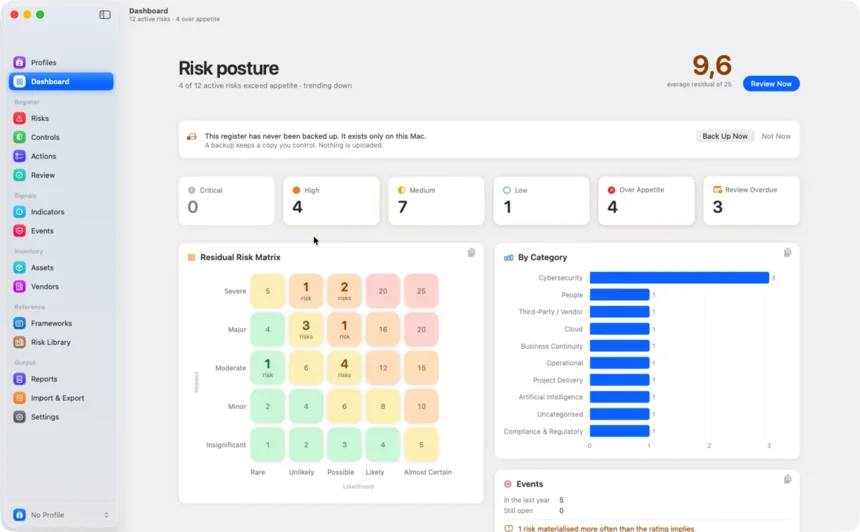
The sidebar chooses a section, the list shows your data, and the panel on the right edits whatever is selected. The dashboard opens on your whole posture: severity counts, the live matrix, and every number clickable through to the risks behind it.
A risk, in full, beside the register
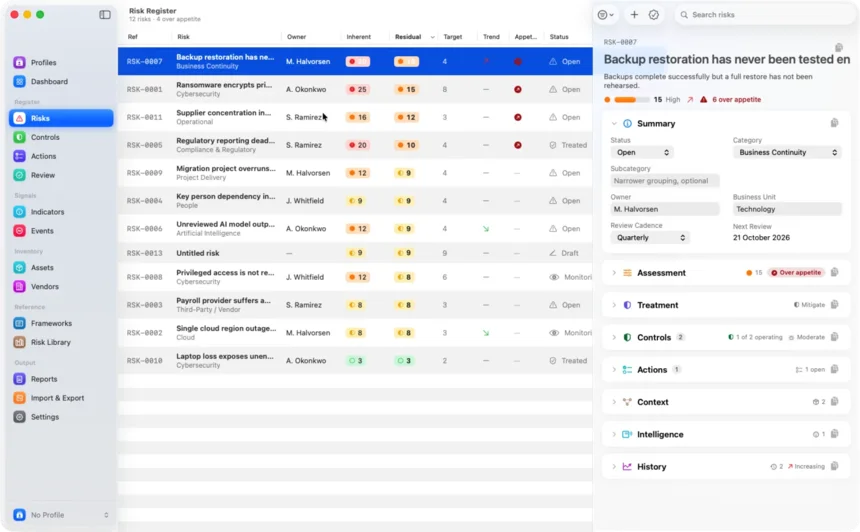
The table sorts on any column and searches every field. Select a row and the panel beside it holds the whole risk — summary, assessment, treatment, controls, actions, context, intelligence and its entire history. Changes save as you type.
Controls have to earn their reduction
Link the controls you rely on and the residual score follows the strongest one that is actually operating. A planned control, however strong it will be, reduces nothing yet — and the register says so rather than flattering the number.
A review pass, not an afternoon
Pick a scope and work the queue one risk at a time, worst first, with the full context on one screen. Confirm, re-score or skip from the keyboard. Skipping leaves a risk completely untouched, so it stays in the next pass.
Numbers that argue with your judgement
Key risk indicators watch something measurable on a cadence and flag movement before anyone re-scores a thing. Recorded events challenge ratings that reality has already contradicted.
Four formats, one snapshot
Choose what the report carries, then export a branded PDF, a self-contained HTML dashboard, a live Excel workbook or send it straight to the printer. They always agree, because they are all built from the same snapshot.
Get to know RiskOS.
Everything a register needs to stay honest, and nothing that needs an account to work.
A register that numbers itself
Every risk gets a human-readable reference like RSK-0042, never reissued, so a conversation about one is never ambiguous. Risks are closed rather than deleted, and the history stays.
Scores you can defend
Rate the inherent exposure; the register does the rest. Residual comes from the controls you link, never from a number typed over the top.
Controls that have to earn it
Record type, status, owner, effectiveness and evidence. Only what is implemented or operating reduces anything.
A review pass, not a chore
Work the queue one risk at a time, worst first, from the keyboard. Skipping leaves a risk untouched so it stays in the next pass.
Signals that argue back
Key risk indicators watch measurable numbers on a cadence. Recorded events challenge ratings reality has already contradicted.
Coverage in three honest states
Covered, mapped but not operating, or not mapped. Ships with the RiskOS Control Baseline and the NIST CSF 2.0 structure, and imports your own.
Assets and vendors, joined up
Link what you are protecting and who you depend on, and see the worst residual risk each one carries.
Reports that all agree
PDF, HTML, Excel and print, every one built from the same snapshot, carrying your branding on every page.
A profile for every client
Methodology, appetite, report defaults and branding, switched with a keystroke — and their name on the cover, never displacing yours.
Private by architecture
No account, no tracking, no analytics, no servers. Your register lives on your Mac and leaves it only when you export it.
Score risks on a living matrix.
Rate likelihood and impact on your own methodology. RiskOS works out the score, names the band, and keeps every assessment you have ever made.
Two ratings, one number
Likelihood multiplied by impact, from 1 to 25, banded Low, Medium, High or Critical. The band is a colour, a symbol and a word together, so it never depends on seeing the difference between amber and orange.
The matrix answers as you go
Markers for inherent, residual and target glide between cells as a rating changes. Click any cell on the dashboard and the register opens filtered to the risks sitting in it.
Every score keeps its reasons
History records each assessment with what drove it, so a rating made eighteen months ago can still be explained in the room.
Treat risks, and watch them fall.
Link the controls you rely on and RiskOS recomputes what is really left. Actions carry the work until the residual score tells the truth.
A control has to be real to count
Only controls that are implemented or operating reduce risk. A planned control, however strong it will be, reduces nothing yet — and the register says so instead of flattering the number.
The arithmetic is never typed in
Residual follows the strongest operating control you have linked, or a value you set by hand. When the two disagree, the risk's panel points it out rather than quietly picking one.
Work that has an owner and a date
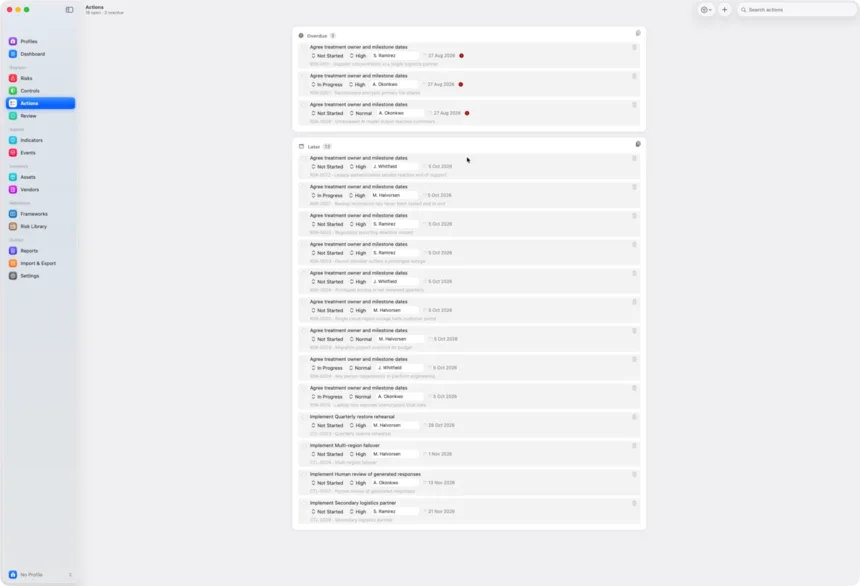
Actions live on the risk and in one list of their own, grouped by what is late and what is next, editable in place.
Check judgement against reality.
Everything else in RiskOS records judgement. These two record observation — and they are the ones that argue back.
Indicators move before ratings do
Measure something real on a cadence — patch latency, failed logins, restore success rate — with a warning and a breach threshold, and the direction that counts as bad. Miss a reading and the indicator is marked overdue.
Events challenge the rating
Record what actually happened, what it cost and how long it took to notice. When a risk materialises more often than its likelihood implies, the register says so and suggests what the observed frequency would justify.
Nothing is scored behind your back
Both surface the disagreement and leave the judgement to you. Re-scoring is always a decision someone made.
Report like you mean it.
One click turns the register into a paginated PDF, a self-contained HTML dashboard, a live Excel workbook or CSV — carrying your business identity, ready for the board.
Four formats that always agree
Every output is built from the same snapshot, so the figure in the PDF and the figure in the workbook can never drift apart.
Your identity on every page
The header and footer designer takes your business name, contact details, registration line and logo, and shows a live preview of exactly what will export and print.
A workbook that keeps working
The Excel export is seven sheets of live formulas: change a likelihood in the workbook and it re-scores itself.
Tailored to every client.
Serve more than one organisation from a single app. A profile keeps a client's methodology, appetite, report defaults and branding together, so switching clients takes a keystroke.
Every export in that client's terms
Scores, thresholds and reports come out under their name and their mark — with your own identity always kept front and centre.
Switch without setting anything up again
Methodology and appetite travel with the profile. Update them from your current settings whenever the client's approach changes.
One profile included
Small Business, Enterprise and Consultant unlock more with a one-time purchase. Never a subscription.
A look around.
Three screens you will spend most of your time in.
Nothing collected. No account. Nobody’s business.
A risk register holds the most sensitive summary of an organisation there is: everything you are afraid of, ranked. RiskOS treats it that way.
The one qualifier, stated plainly: purchases go through Apple’s App Store, which never sees your register. Read the privacy policy.
Fair questions.
RiskOS is a risk register for macOS. It captures the risks you are carrying, scores them consistently on a 5×5 matrix, tracks the controls and actions that treat them, watches the indicators that would warn you first, and turns the whole thing into a report your board will read. Everything happens on your Mac.
No. There is no account, no sign-in, no servers and no sync. Your register stays in this Mac's own storage and leaves it only when you export or back it up yourself. The only network RiskOS uses is Apple's App Store, for purchases, and that never sees your register.
A Mac running macOS 14.0 or later. There is nothing to configure and nothing to connect: the first launch opens an empty register ready for your first risk.
You rate inherent likelihood and impact from 1 to 5. The score is the two multiplied, from 1 to 25, banded Low (1–4), Medium (5–9), High (10–16) or Critical (17–25). Residual risk is then calculated from the effectiveness of the controls you link, and the register always shows how it got there.
Yes. Import risks from CSV, and controls, assets and vendors too. Every import shows you line by line what will be created, updated or skipped before anything is written, and scores are always recalculated rather than read from the file.
A paginated PDF with your own branding, a self-contained HTML dashboard that opens in any browser, a live Excel workbook whose formulas re-score themselves, and CSV. You can print the PDF directly. All four are built from the same snapshot, so they always agree.
Yes. A profile dresses the whole app for one client — its own methodology, risk appetite, report defaults and branding — and switching between them takes a keystroke. RiskOS includes one profile, and Small Business, Enterprise and Consultant tiers unlock more.
No. RiskOS is a one-time purchase, and the profile tiers that unlock extra client profiles are one-time purchases too. Nothing renews.
Your register. On your Mac.
Score it consistently, treat it properly, review it without dread, and report it like you mean it — without an account, a server or a single byte leaving the machine.